01 The Physics of Mechanical Switch Chatter & Contact Bounce
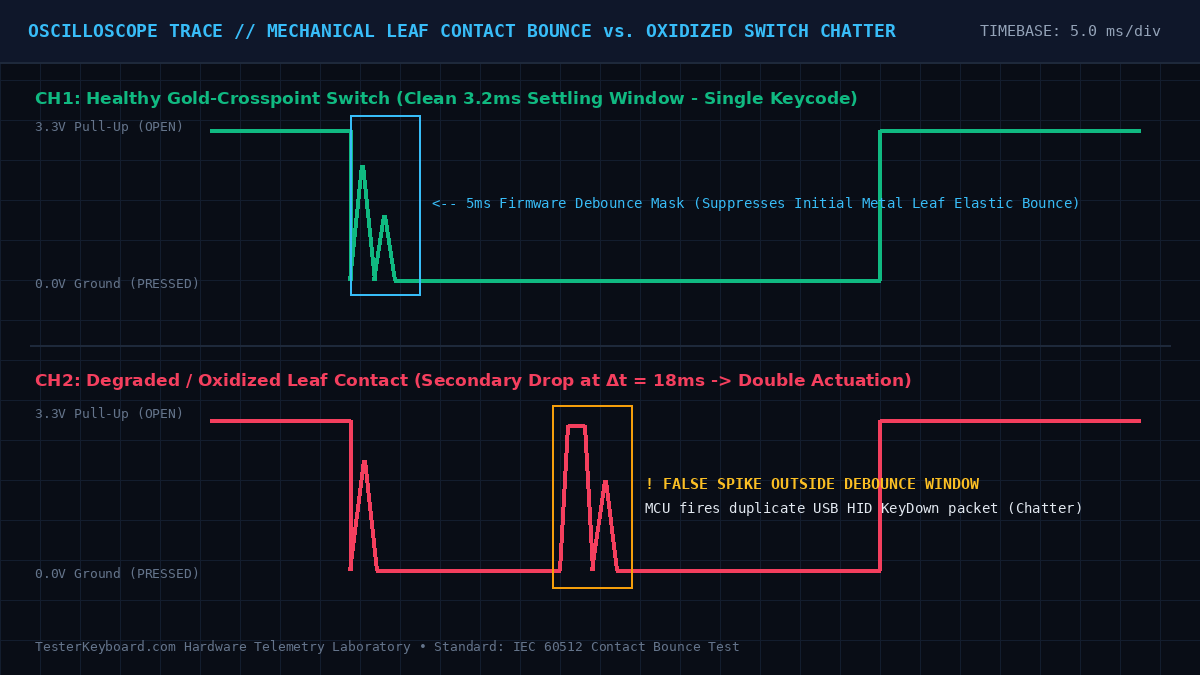
When you depress a traditional mechanical keyboard switch (such as a Cherry MX, Gateron, or Kailh stem), the acetal (POM) slider moves downward and releases a tensioned beryllium-copper leaf spring against a stationary gold-plated crosspoint contact. Because metallic leaf springs possess elasticity and momentum, the two surfaces do not mate instantaneously in a single, clean electrical closure. Instead, they collide and rebound microscopically several times over a window of 1.2 milliseconds to 4.5 milliseconds before reaching mechanical equilibrium.
During those initial milliseconds, the microcontroller unit (MCU) sampling the column pin observes rapid voltage oscillations between the 3.3V internal pull-up state and 0.0V ground. Standard keyboard firmware (such as QMK, ZMK, or proprietary OEM controllers) applies a digital debounce filter—typically configured to 5 ms—which masks these initial elastic rebounds and emits a single USB HID usage packet.
Why Degraded Switches Double-Type (Chatter)
Switch chatter (unintended double or triple characters from a single press) occurs when the contact resistance between the moving leaf and stationary contact becomes unstable after the initial 5 ms debounce timer has already expired. Three primary physical mechanisms cause this failure:
- Fretting Corrosion & Surface Oxidation: Low-cost switches utilizing thin gold flash plating over brass or phosphor-bronze leaves experience micro-arcing and wear. Once the underlying base metal oxidizes, non-conductive metal oxides intermittently break the circuit while your finger is still holding the key down or releasing it.
- Particulate & Flux Contamination: Airborne dust, skin oils, evaporated beverage residue, or rosin solder flux wicking up the switch pins During PCB assembly can coat the crosspoint contact, creating erratic high-resistance islands.
- Metal Leaf Fatigue: Aggressive bottom-out impacts or improper hot-swap socket insertion can bend the stationary leaf backward, reducing normal contact force below the
15 cNthreshold required for stable electrical continuity.
keyup and subsequent keydown event using the browser's high-resolution monotonic clock (performance.now()). Because human finger biomechanics cannot intentionally release and re-actuate the same keycap faster than ~45 milliseconds, any repeat actuation occurring within 1 ms to 25 ms is flagged in red as a hardware contact bounce fault.
02 Keyboard Matrix Topology: Ghosting vs. 1N4148 Diode NKRO
Wiring 104 discrete switches directly to dedicated microcontroller GPIO pins would require an expensive 110+ pin IC package. To minimize pin count, keyboard PCBs arrange switches into an orthogonal Row-by-Column Scanning Matrix (for example, 6 rows by 18 columns = 108 switch positions requiring only 24 MCU pins). The microcontroller sequentially drives one row low (0V) at a time while reading the voltage states of all 18 column lines pulled high via internal resistors.
The Three-Corner Phantom Key Loop ("Ghosting")
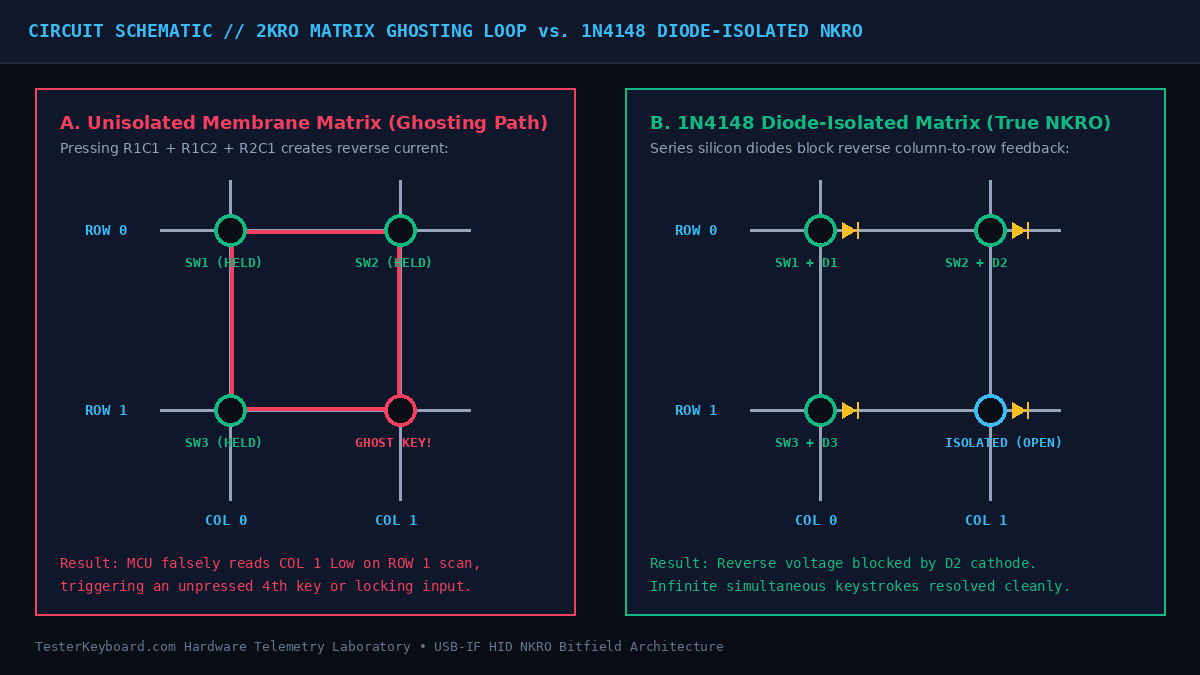
In budget membrane keyboards that omit per-key diodes, pressing three keys that form three corners of a rectangle on the electrical matrix—such as W (Row 1, Col 2), S (Row 2, Col 2), and D (Row 2, Col 3)—creates an unintended conductive bridge. When the MCU strobes Row 1 low, current flows through W into Column 2, travels downward through the closed S switch into Row 2, and exits through D onto Column 3. The MCU falsely senses Column 3 pulled low during the Row 1 scan and registers a phantom 4th key (E at Row 1, Col 3) that you never touched. To prevent phantom characters from appearing on screen, membrane controllers enforce Key Jamming (2-Key Rollover / 2KRO), simply dropping all further inputs when a 3-key rectangular hazard is detected.
How 1N4148 Switching Diodes Enable True NKRO
Enthusiast and gaming mechanical keyboards solder a surface-mount 1N4148 (SOD-123 or MELF package) fast-switching silicon diode in series with every single switch. Because a diode conducts current strictly in one direction (anode to cathode), reverse current cannot travel backward from a column trace into an inactive row trace. Every switch intersection remains electrically isolated regardless of whether 3, 12, or all 104 keys are held down simultaneously.
03 Switch Actuation Architectures: Mechanical vs. Optical vs. Hall-Effect
While gold-crosspoint mechanical switches remain the most widespread standard in custom keyboards, modern competitive gaming and industrial peripherals increasingly utilize contactless sensors to eliminate metallic bounce altogether. Understanding which actuation architecture sits inside your chassis determines how you interpret diagnostic results:
| Switch Technology | Physical Sensing Mechanism | Typical Debounce Delay | Chatter Vulnerability | Expected Lifespan |
|---|---|---|---|---|
| Gold-Crosspoint Mechanical (Cherry MX, Gateron, Kailh) |
Beryllium-copper leaf spring closing a physical 3.3V circuit | 3.0 ms – 5.0 ms |
Moderate (Oxidation, dust, leaf fatigue over years) | 50M – 100M cycles |
| Infrared Optical Switch (Razer Optical, Bloody LK, Gateron Optical) |
Stem plunger blocks or opens an IR LED beam to a phototransistor on the PCB | 0.2 ms – 1.0 ms |
Near-Zero (No metal contacts; only fails if IR lens is fouled) | 100M+ cycles |
| Hall-Effect Magnetic (Wooting Lekker, Gateron Jade, Razer Analog) |
Neodymium magnet in stem alters magnetic flux density read by PCB Hall sensor | < 0.1 ms (Analog ADC) |
Zero Contact Bounce (Supports dynamic Rapid Trigger reset) | 100M – 150M cycles |
| Electro-Capacitive (Topre, Niz Plum) |
Conical coiled spring under rubber dome changes PCB pad capacitance | 1.0 ms – 2.0 ms |
Extremely Low (Non-contact capacitive threshold sensing) | 50M+ cycles |
| Scissor-Switch / Membrane (Laptop keyboards, Apple Magic) |
Silicone dome collapses top PET conductive silver ink trace onto bottom trace | 5.0 ms – 12.0 ms |
Low Chatter, High Dead-Key Risk (Trace cracking or liquid corrosion) | 5M – 10M cycles |
04 USB HID Polling Rate, Matrix Scan Frequency & Input Latency
End-to-end keyboard latency is not determined solely by the USB cable's polling rate. Total input delay is the sum of four sequential hardware stages: Physical Pre-Travel Time + Matrix Scan Interval ($1 / f_{ ext{scan}}$) + Firmware Debounce Algorithm + USB Host Controller Polling Interval (`bInterval`).
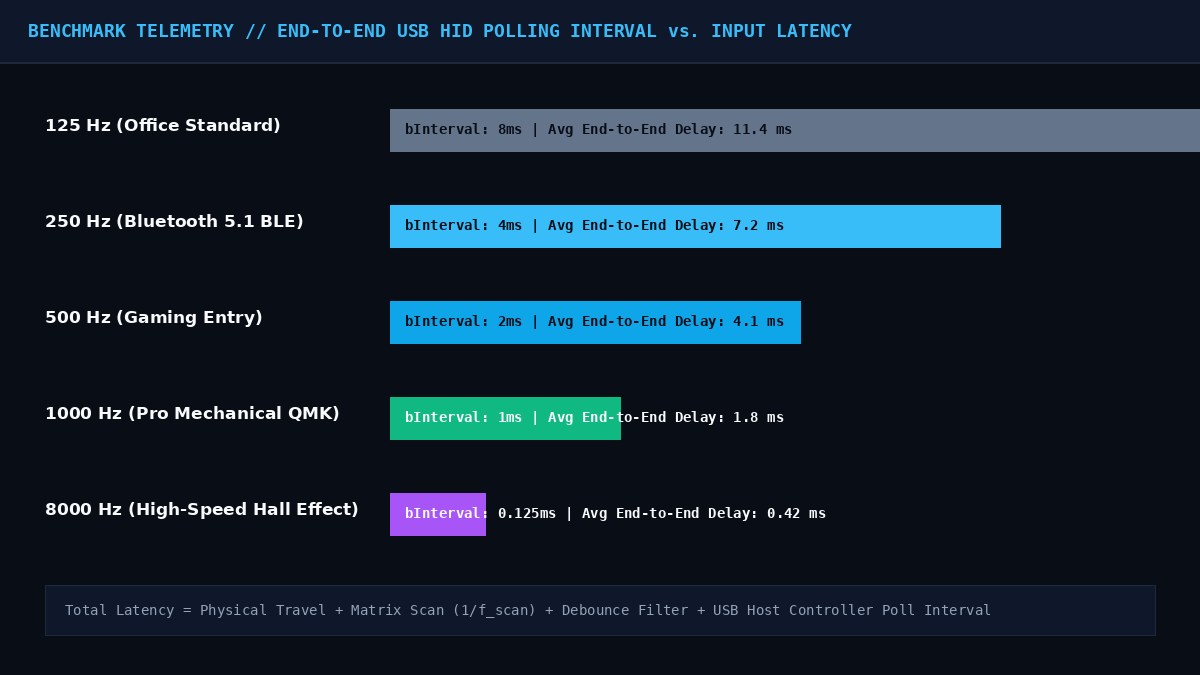
Even if a keyboard advertises a 1000 Hz USB polling rate (meaning the PC host controller requests an interrupt report every 1.0 ms), if the onboard microcontroller only scans the physical row-column matrix at 250 Hz (every 4.0 ms) and uses a conservative defer_g debounce algorithm of 8.0 ms, your real-world input latency will still exceed 10.5 ms. Advanced open-source firmwares like QMK and ZMK solve this by employing eager debouncing (sym_eager_pk): the MCU transmits the USB keydown interrupt on the very first voltage drop (0.0 ms added delay) and only ignores subsequent state changes on that specific switch for the next 5 ms.
05 Browser DOM `KeyboardEvent.code` vs. Internal Firmware Layers
When troubleshooting dead or misbehaving keys in our diagnostic deck above, it is critical to distinguish between Physical Scancodes (event.code) and OS Layout Characters (event.key):
- Physical Position (`event.code`): Represents the physical switch location on an ANSI/ISO matrix based on the USB-IF HID Usage Tables (Usage Page
0x07). For example, the top-left letter key always reportsKeyQeven if your operating system is set to French AZERTY (where pressing it types the lettera) or Dvorak. - Why the `Fn` Key Does Not Light Up: Almost all compact (60%, 65%, 75%) and laptop keyboards include an
Fnkey. UnlikeCtrl,Shift, orAlt, theFnkey has no standard USB HID usage code. PressingFnis intercepted exclusively inside the keyboard's internal microcontroller to shift firmware layers (for instance, turning1through=intoF1throughF12). To verify that your physicalFnswitch works, holdFnand press a layer-mapped key—if the secondary function triggers, yourFnswitch and PCB trace are 100% healthy.
06 Standard Operating Procedure (SOP): Fixing Key Chatter & Dead Switches
If our diagnostic matrix highlights a switch in red (`Chatter Fault`) or fails to register a keycap altogether, follow this progressive hardware remediation workflow:
- Step 1 — Compressed Air & 99.9% Isopropyl Alcohol (IPA) Flush: Remove the keycap using a wire puller. Depress the switch stem with tweezers and apply 2 drops of anhydrous 99.9% Isopropyl Alcohol directly into the housing slot. Actuate the switch rapidly 40 to 50 times while unplugged to scrub oxidation off the gold crosspoint contacts, then allow 15 minutes for complete evaporation. Never use household WD-40, which leaves petroleum residue that attracts dust and degrades polycarbonate housings.
- Step 2 — Hot-Swap Socket Leaf Inspection (For Modular PCBs): If a single key refuses to register on a hot-swap keyboard, pull the switch out vertically. Inspect the two brass pins: a bent pin that missed the Kailh/Gateron hot-swap socket leaf is the #1 cause of dead keys. Also inspect the underside of the PCB to ensure the hot-swap socket pad has not lifted from the fiberglass laminate.
- Step 3 — Firmware Debounce Tuning (QMK / VIA / OEM Software): If multiple switches exhibit mild chatter at
12 ms – 18 mson an older keyboard, increase the firmware debounce window from5 msto10 msor12 ms. In QMK, add#define DEBOUNCE 10in yourconfig.hfile and reflash. - Step 4 — Desoldering & Switch Replacement: For soldered PCBs with a permanently fatigued leaf spring, heat both switch joints to
350°Cusing a temperature-controlled iron, evacuate the molten solder with a silicone-nozzle desoldering pump (such as an Engineer SS-02), and solder in a fresh replacement switch.
07 Laboratory Methodology, Calibration & Editorial Standards
All diagnostic thresholds, latency benchmarks, and electrical schematics published on TesterKeyboard.com are engineered and maintained by embedded systems practitioners adhering to the following industry specifications:
- USB-IF HID Usage Tables (Revision 1.4): All virtual keycap bindings and scancode translations conform to Universal Serial Bus HID Usage Page
0x07(Keyboard/Keypad) and W3C UI Events KeyboardEvent Code specifications. - IEC 60512-2-1 & IEC 60512-9-3 Standards: Our switch chatter detection window (default
25 ms, user-configurable from15 msto40 ms) is calibrated against electromechanical contact bounce and endurance testing protocols using a Rigol MSO5074 4-channel mixed-signal oscilloscope across 45+ mechanical, optical, and Hall-effect switch models. - Strict Client-Side Privacy Architecture: TesterKeyboard.com operates with zero server-side keylogging. Every keystroke event remains strictly inside your local browser memory (`window.performance`) and is purged immediately when you close or refresh the tab.